

What Is The Cyber Kill Chain? #
Before we start talking about handling incidents, we need to understand the attack lifecycle (a.k.a. the cyber kill chain). This lifecycle describes how attacks manifest themselves. Understanding this lifecycle will provide us with valuable insights into how far in the network an attacker is and what they may have access to during the investigation phase of an incident.
The cyber kill chain consists of seven different stages, as depicted in the image below: 
Stages of the Cyber Kill Chain #
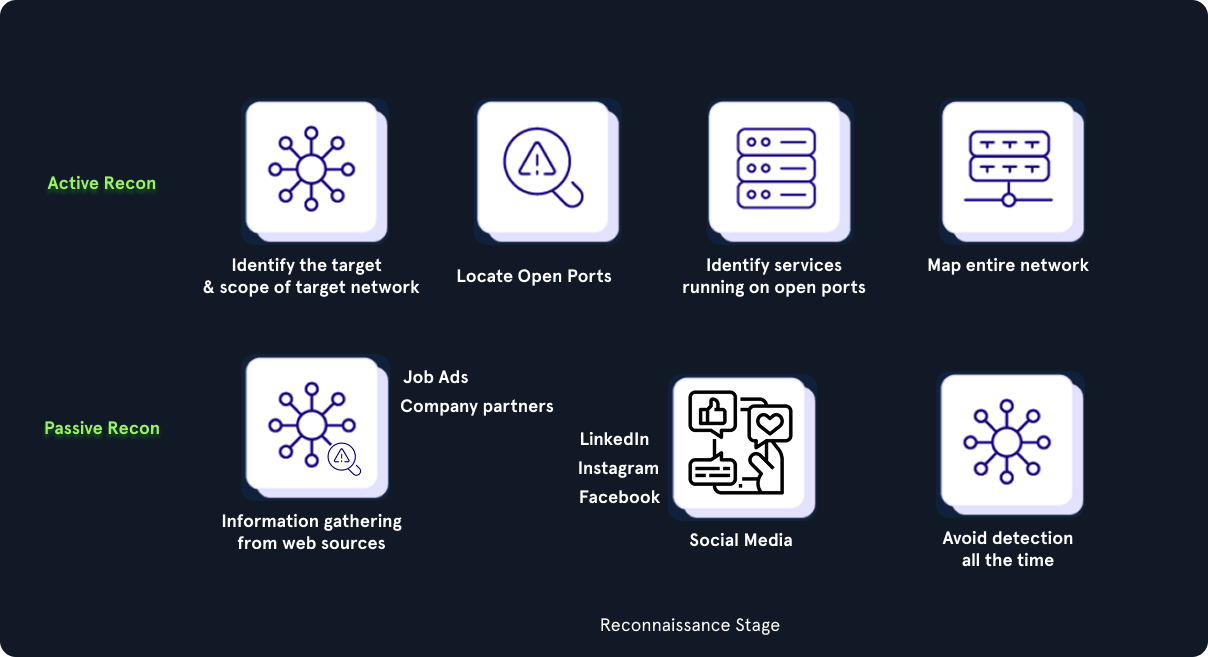
The Recon (Reconnaissance) stage is the initial stage, and it involves the part where an attacker chooses their target. Additionally, the attacker performs information gathering to become more familiar with the target and gathers as much useful data as possible, which can be used not only in this stage but also in other stages of this chain. Some attackers prefer to perform passive information gathering from web sources such as LinkedIn and Instagram, but also from documentation on the target organization’s web pages. Job ads and company partners often reveal information about the technology utilized in the target organization. They can provide extremely specific information about antivirus tools, operating systems, and networking technologies. Other attackers go a step further; they start ‘poking’ and actively scan external web applications and IP addresses that belong to the target organization.
In the Weaponize stage, the malware to be used for initial access is developed and embedded into some type of exploit or deliverable payload. This malware is crafted to be extremely lightweight and undetectable by antivirus and detection tools. It is likely that the attacker has gathered information to identify the present antivirus or EDR technology present in the target organization. On a large scale, the sole purpose of this initial stage is to provide remote access to a compromised machine in the target environment, which also has the capability to persist through machine reboots and the ability to deploy additional tools and functionality on demand.
In the Delivery stage, the exploit or payload is delivered to the victim(s). Traditional approaches include phishing emails that either contain a malicious attachment or a link to a web page. The web page can serve two purposes: either containing an exploit or hosting the malicious payload to avoid sending it through email scanning tools. In some cases, the web page can also mimic a legitimate website used by the target organization in an attempt to trick the victim into entering their credentials and collecting them. Some attackers call the victim on the phone with a social engineering pretext in an attempt to convince the victim to run the payload. The payload in these trust-gaining cases is hosted on an attacker-controlled website that mimics a well-known website to the victim (e.g., a copy of the target organization’s website). It is extremely rare to deliver a payload that requires the victim to do more than double-click an executable file or a script (in Windows environments, this can be .bat, .cmd, .vbs, .js, .hta, and other formats). Finally, there are cases where physical interaction is utilized to deliver the payload via USB tokens and similar storage tools that are purposely left around.
The Exploitation stage is the moment when an exploit or a delivered payload is triggered. During the exploitation stage of the Cyber Kill Chain, the attacker typically attempts to execute code on the target system in order to gain access or control.
In the Installation stage, the initial stager is executed and is running on the compromised machine. As already discussed, the installation stage can be carried out in various ways, depending on the attacker’s goals and the nature of the compromise. Some common techniques used in the installation stage include:
- Droppers: Attackers may use droppers to deliver malware onto the target system. A dropper is a small piece of code designed to install malware on the system and execute it. The dropper may be delivered through various means, such as email attachments, malicious websites, or social engineering tactics.
- Backdoors: A backdoor is a type of malware designed to provide the attacker with ongoing access to the compromised system. The backdoor may be installed by the attacker during the exploitation stage or delivered through a dropper. Once installed, the backdoor can be used to execute further attacks or steal data from the compromised system.
- Rootkits: A rootkit is a type of malware designed to hide its presence on a compromised system. Rootkits are often used in the installation stage to evade detection by antivirus software and other security tools. The rootkit may be installed by the attacker during the exploitation stage or delivered through a dropper.
In the Command and Control stage, the attacker establishes a remote access capability to the compromised machine. As discussed, it is not uncommon to use a modular initial stager that loads additional scripts ‘on-the-fly’. However, advanced groups will utilize separate tools to ensure that multiple variants of their malware live in a compromised network, and if one of them gets discovered and contained, they still have the means to return to the environment.
The final stage of the chain is the Action or objective of the attack. The objective of each attack can vary. Some adversaries may aim to exfiltrate confidential data, while others may want to obtain the highest level of access possible within a network to deploy ransomware. Ransomware is a type of malware that renders all data stored on endpoint devices and servers unusable or inaccessible unless a ransom is paid within a limited timeframe (not recommended).
It is important to understand that adversaries don’t operate linearly (as the Cyber Kill Chain suggests). Some previous Cyber Kill Chain stages will be repeated multiple times. For example, after the Installation stage of a successful compromise, the logical next step for an adversary is to initiate the Recon (Reconnaissance) stage again to identify additional targets and find vulnerabilities to exploit, allowing them to move deeper into the network and eventually achieve the attack’s objective(s).
Our objective is to stop an attacker from progressing further up the kill chain, ideally in one of the earliest stages.
MITRE ATT&CK Framework #
Another framework for understanding adversary behavior is the MITRE ATT&CK framework. It is a more granular, matrix-based knowledge base of adversary tactics and techniques used to achieve specific goals. Cybersecurity professionals use both frameworks to understand and defend against cyberattacks.
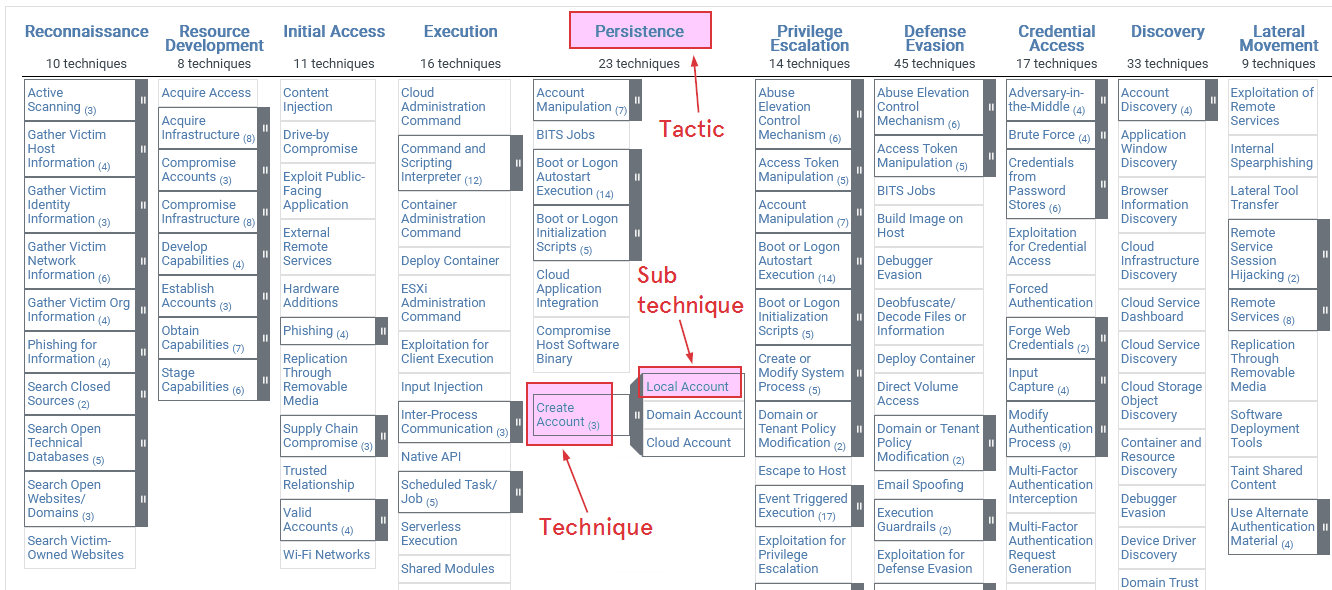
The MITRE ATT&CK Enterprise Matrix is a knowledge base that documents adversary behavior observed in the wild against enterprise IT environments (Windows, Linux, macOS, cloud, network, mobile, etc.). It is presented as a matrix where columns represent adversary goals (tactics), and cells are techniques attackers use to achieve those goals. The framework helps defenders understand, model, detect, and respond to attacker behavior in a structured way.
The screenshot below shows an example of the MITRE ATT&CK Enterprise Matrix:
Tactic #
A tactic is a high-level adversary objective during an intrusion (the goal they want to accomplish at that stage). For Example:
Initial Access.Persistence.Privilege Escalation.
Technique #
A technique is a specific method adversaries use to achieve a tactic. Techniques describe concrete attacker behavior (tools, commands, APIs, protocols, etc.).
Techniques have IDs like T1105 (Ingress Tool Transfer) or T1021 (Remote Services). For example:
T1105 Ingress Tool Transfer: Refers to the tools used by attackers to download a tool, such aswget,curl, etc., commonly OS built-in commands/tools.T1021 Remote Services: Refers to adversaries using protocols such as SSH, RDP, and SMB for lateral movement.
Sub-technique #
Sub-techniques are children of techniques that capture a particular implementation or target. Sub-technique IDs extend the parent technique: T1003.001 (Credential Dumping -> LSASS Memory), T1021.002 (Remote Services -> SMB/Windows Admin Shares). For example:
T1003.001 - OS Credentials: LSASS Memory: Refers to adversaries dumping credentials directly from the LSASS process memory when achieving the necessary privileges.T1021.002 - Remote Services: SMB/Windows Admin Shares: Refers to adversaries interacting with shares using valid credentials.
This enables precise detection, attribution, and reporting (we can say “We detected T1003.001 — LSASS memory dumping” instead of just T1003).
Pyramid of Pain #
In the diagram below, the Pyramid of Pain illustrates how much effort it takes for an adversary to change their tactics when defenders detect and block different types of indicators. At the base of the pyramid are simple indicators like hash values, IP addresses, and domain names — these are easily changed by attackers (low pain).
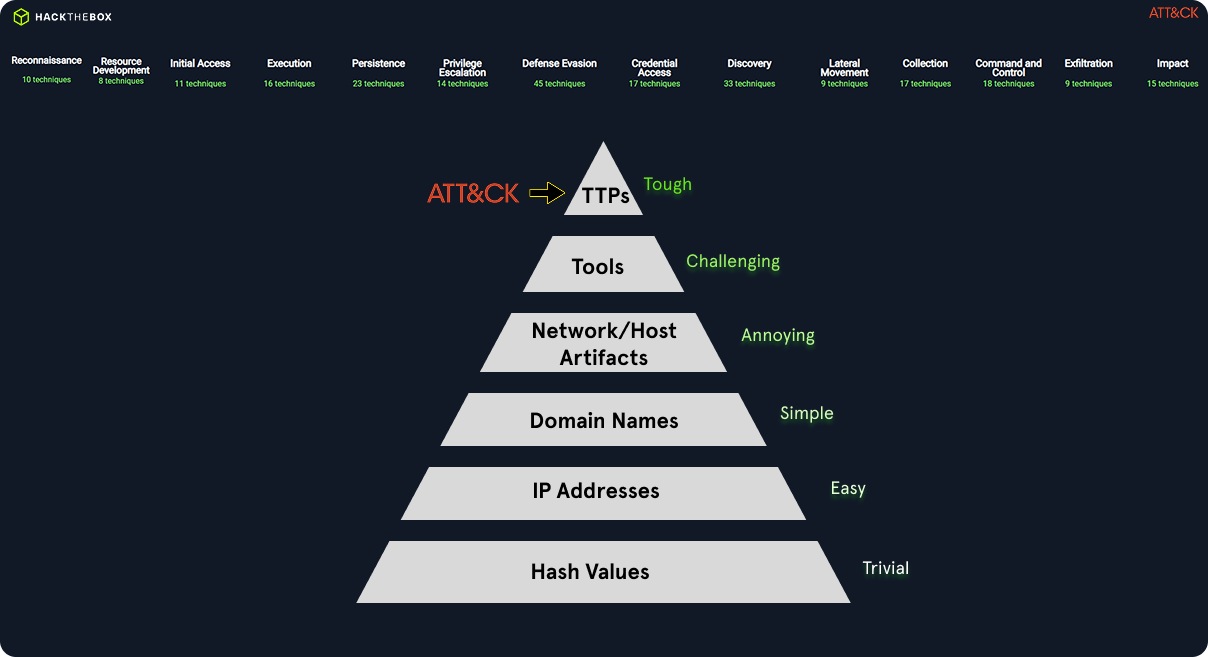
For example, blocking a malicious IP in a MITRE ATT&CK “Command and Control” (T1071) scenario will only slightly slow down the adversary since they can quickly switch to a new C2 server. Moving upward, network and host artifacts (like registry keys, mutex names, or filenames) correspond to specific techniques in ATT&CK (e.g., T1547.001 – Registry Run Keys/Startup Folder). These take more effort to change and are more resilient indicators for defenders.
At the top of the pyramid are Tools, Tactics, Techniques, and Procedures (TTPs) — these align directly with the core of MITRE ATT&CK. Detecting and disrupting these (e.g., identifying PowerShell abuse under T1059 or process injection under T1055) forces the adversary to fundamentally change how they operate — causing maximum pain.
In summary:
- Hash/IP detections =
easyto evade. - Behavioral TTP detections (MITRE-based) =
hard to evade, higher attacker cost, and stronger defense maturity.
Analysts map observed events and indicators to ATT&CK techniques and tactics to quickly understand adversary intent and likely next steps. Usually, it is also used to prioritize alerts based on techniques that target high-value assets. Additionally, it can be used to refer to the mitigation and containment/eradication actions that disrupt the attacker’s kill chain.
MITRE ATT&CK integration in TheHive #
TheHive is a case management platform designed for cybersecurity teams to efficiently handle incidents by processing alerts. Users can create cases and link multiple relevant alerts within them. This platform serves as a centralized hub to collect and manage all security alerts from various devices on a single, comprehensive page. Additionally, TheHive offers the capability to import all MITRE ATT&CK Framework Tactics, Techniques, and Procedures (TTPs) into its alert management system. This integration enriches incident analysis by associating discovered attack patterns with the alerts.
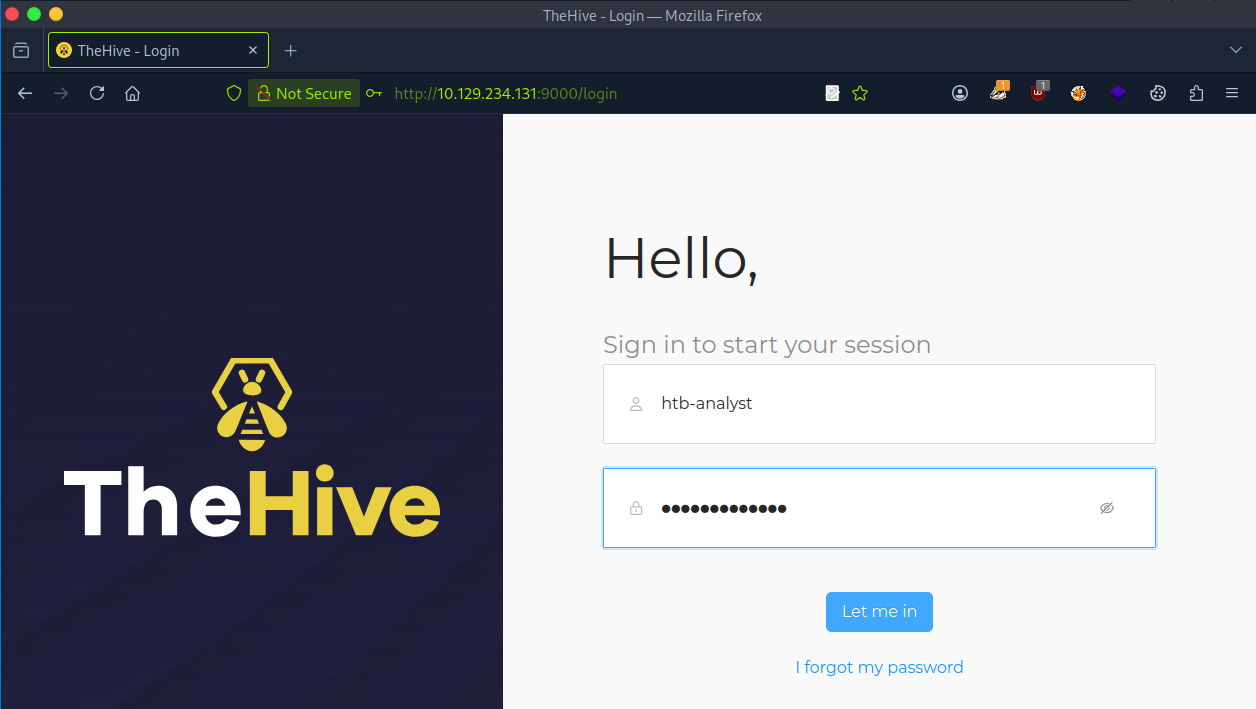
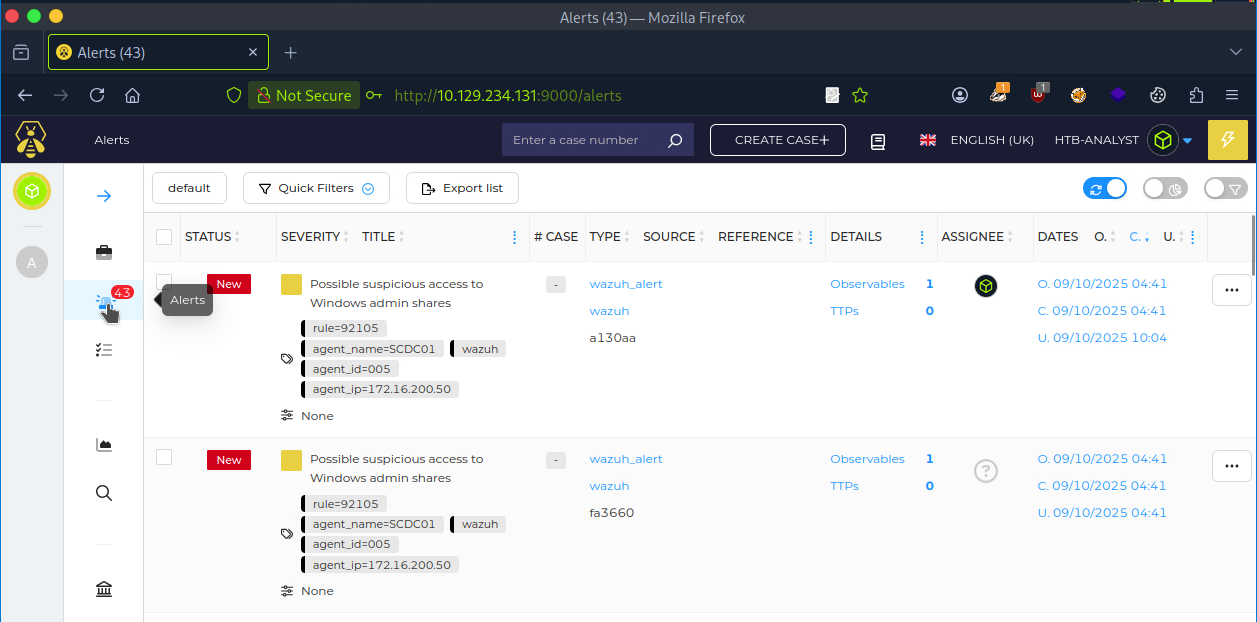
Upon logging in, the dashboard will be displayed. We can view the alerts page as shown in the screenshot below, allowing us to view and manage alerts effectively.
Example of MITRE ATT&CK Mapping #
The table below shows some of the techniques (MITRE ATT&CK) that were observed during the incident.
| Tactic | Technique | ID | Description |
|---|---|---|---|
Initial Access | Exploit Public-Facing Application | T1190 | Confluence CVE exploited |
Execution | Command and Scripting Interpreter: PowerShell | T1059.001 | PowerShell used for payload download |
Persistence | Windows Service | T1543.003 | Windows Service for persistence |
Credential Access | LSASS Memory Dumping | T1003.001 | Extracted credentials |
Lateral Movement | Remote Desktop Protocol | T1021.001 | RDP lateral movement |
Impact | Data Encrypted for Impact | T1486 | LockBit ransomware |