

Incident Scenario #
The victim in this incident is Insight Nexus, a mid-sized market research and data analytics firm headquartered in Singapore. They provide competitive intelligence and consumer insights for global clients, including Fortune 500 companies in IT and finance. Their infrastructure includes many applications, servers, and hosts, but we’ll focus on the important ones, such as an internet-facing application stack for clients, a ManageEngine server for IT administration, and a PHP-based customer reporting portal. Because of the nature of their work, they became an attractive target for adversaries interested in client data theft.
Let’s take a look at the incident to understand some challenges that incident handlers face. This incident shows an example of the patterns repeatedly observed in real-world incidents. The victim in this scenario is Insight Nexus, a global market research firm that handles sensitive competitive data for high-profile clients in the IT sector. The firm becomes a target of two distinct threat groups operating simultaneously within its environment. The first threat actor gained entry when system administrators forgot to change the default admin/admin password on an internet-facing application, i.e., ManageEngine ADManager Plus, after a product update. By leveraging this, the attackers logged in successfully, performed reconnaissance, mapped users and machines, and eventually created new privileged Active Directory accounts. Using one of the newly created accounts, the adversaries pivoted further into the environment, identifying an external RDP service exposed by misconfiguration. Exploiting that entry point, they escalated their control and eventually used Group Policy Objects (GPOs) to deploy spyware using an MSI package across multiple endpoints.
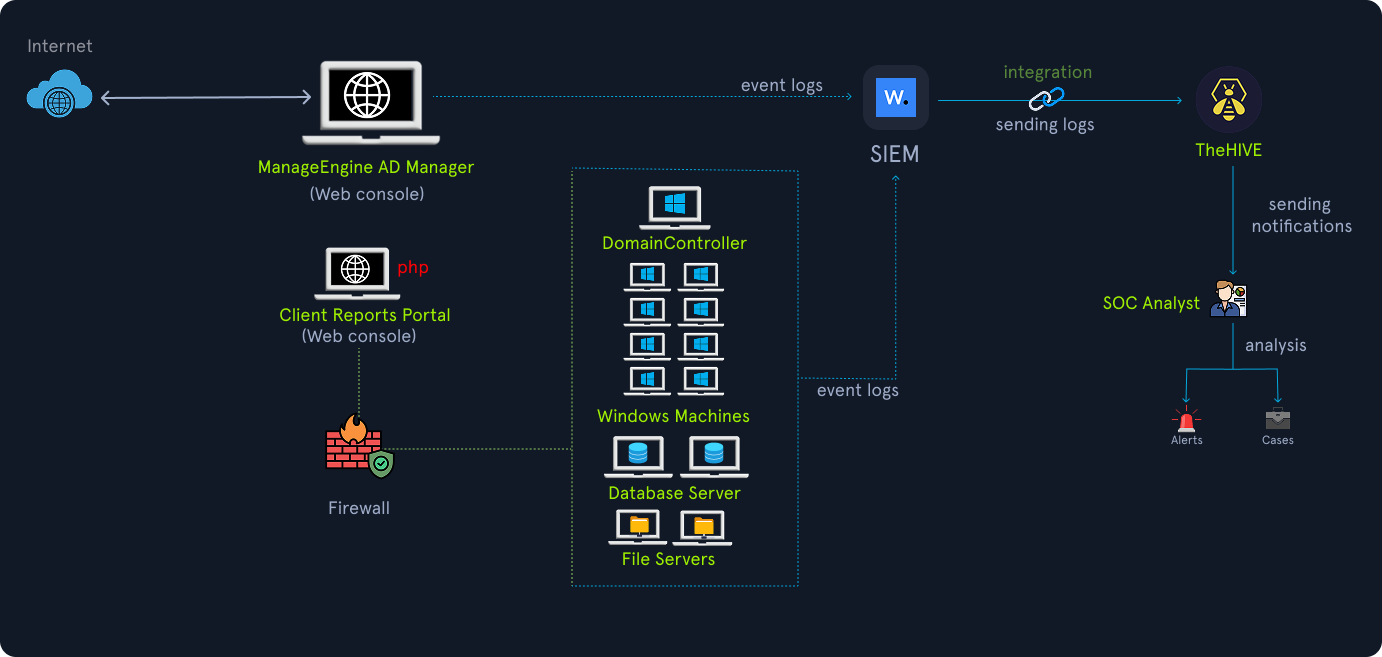
For days, these activities went unnoticed. The incident was first discovered one day when an analyst from the SOC team investigated an alert on TheHive (Security Incident Response Platform) related to the creation of a suspicious file named checkme.txt in the root of a web server. Upon investigation, they discovered that it was deliberately placed there as a signature — “SilentJackal was here”. This unusual artifact triggered a deeper investigation. What made the situation more complex was that the SOC team then realized two different threat actor groups were active in the same environment. While the first group was still exploring and deploying persistence mechanisms, a second actor had already compromised a vulnerable PHP application earlier, exfiltrated sensitive market research data, and significantly reduced their activity after achieving their objective, leaving only occasional connections to an external IP.
Threat Actors #
Crimson Fox(Primary threat actor): A group with known links to the IT industry supply chain targeting, suspected to be state-backed. They specialize in credential theft and long-term persistence for data exfiltration. It is a capable and persistent group known for several previous successful attacks related to supply-chain and corporate intelligence.Silent Jackal(Secondary actor): A loosely organized criminal group focused on opportunistic website defacements and proof-of-concept intrusions, not necessarily financially motivated but disruptive. The members of this group are low-skill web intruders.
Environment & Important Assets #
Public Internet #
- External Web Application (
manage.insightnexus.com): The web applicationManageEngine ADManager Plusprovides the capability for Active Directory management to the organization’s system administrators. HTTPS (port 443) was accessible from the Internet (management portal). - Client Reports Portal (
portal.insightnexus.com): A PHP-based client reporting portal (file upload enabled for reports).
Internal environment structure #
Domain Controller: DC01.insight.localFile Server: FS01.insight.local (file share: \fs01\projects)Database Server: DB01.insight.local contains sensitive databases.Workstations: This includes the developer fleet (ranging from DEV-001 to DEV-120), including some workstations with permissions to allow incoming RDP connections. A Windows machine with external RDP exposure was discovered during reconnaissance: DEV-021 (misconfigured).
Security #
- Perimeter
firewallwith default logging (no integration with Threat Intelligence). - Basic
IDSwith a high false-positive rate. Wazuhagents on most Windows hosts (partial coverage).- Centralized
SIEM(Wazuh) ingesting Windows Sysmon, Windows Security, web server logs, and firewall logs (limited retention). TheHiveis used for case management, with Cortex available for enrichment.
Incident Analysis #
A system administrator noticed unusual outbound connections from the ManageEngine server to an IP address in Eastern Europe while working on the server for scheduled maintenance. He called the SOC team and collaborated with them to investigate the alerts to find anything suspicious. One of the SOC analysts started investigating the alerts and found an alert mentioning a suspicious checkme.txt file on the same server.
Detection Gap: There were too many alerts about new files being created on the servers, and this alert was not escalated due to alert fatigue. They need to reduce some false positives and add more filters.
The SOC team started investigating this incident and found many reconnaissance attempts on the external web applications.
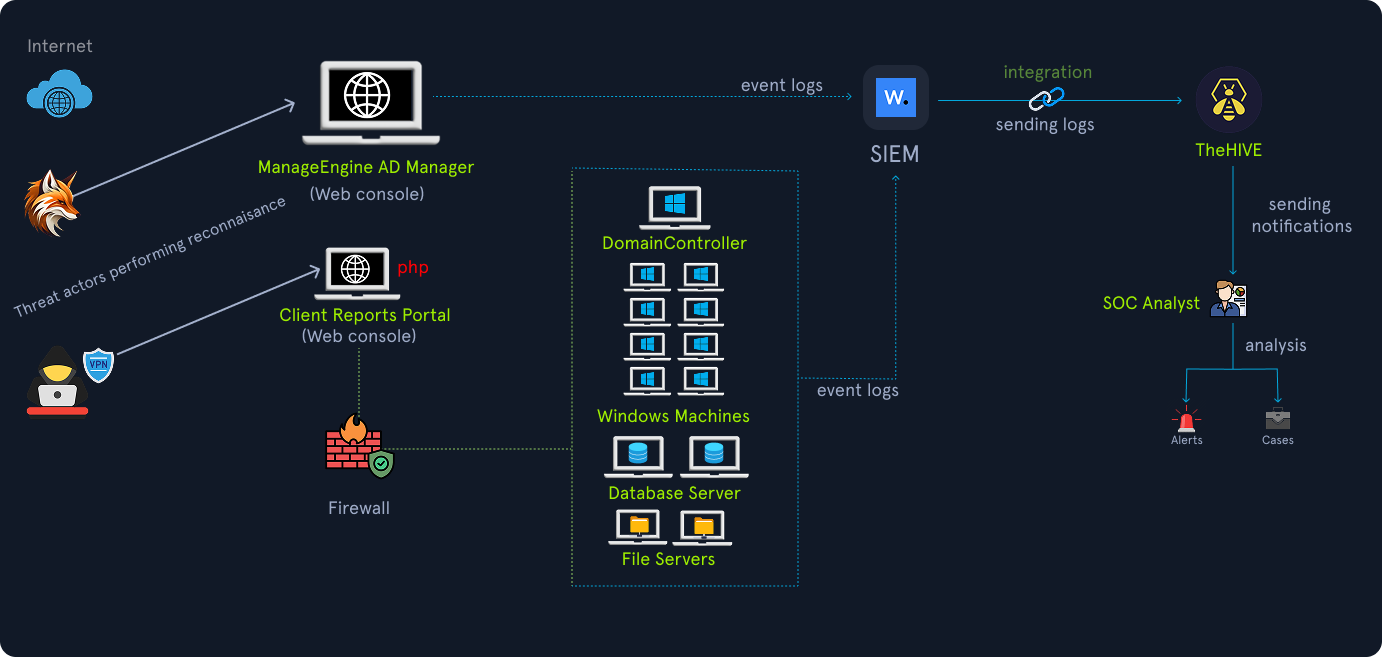
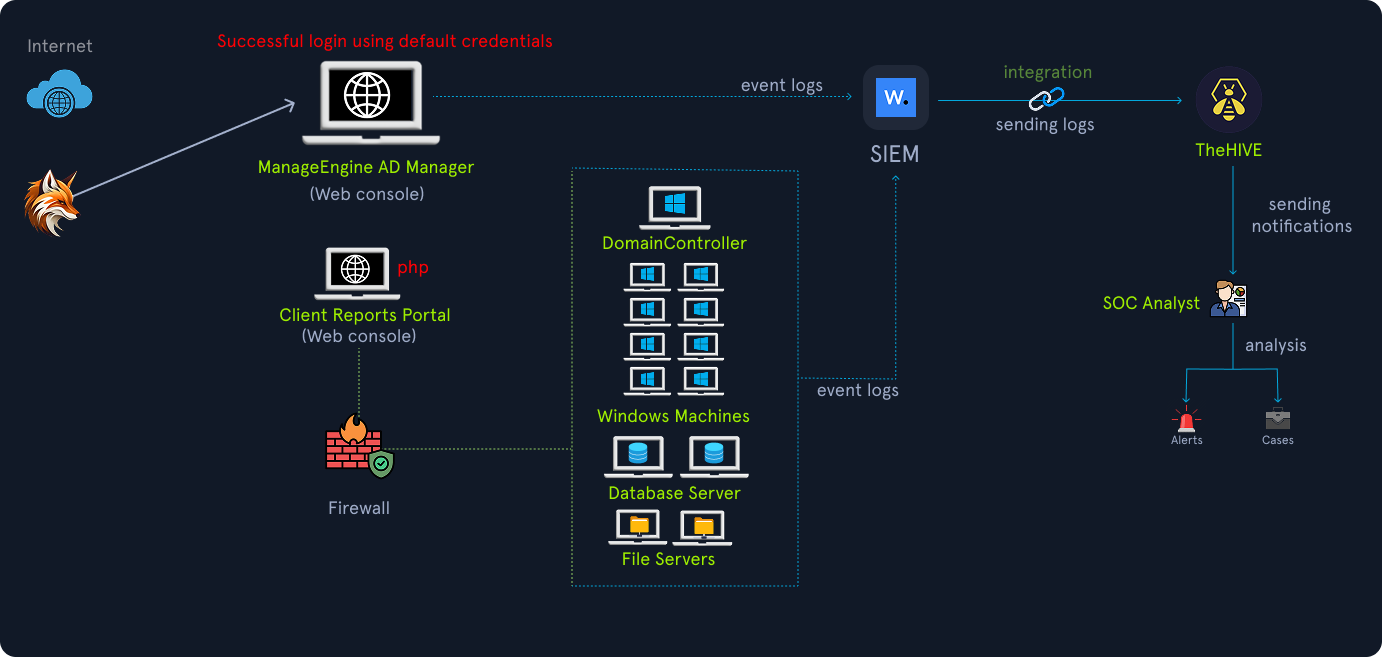
Upon further investigation, the responders found that on 2025-10-01 03:12:02, the threat actor Crimson Fox obtained initial access via ManageEngine. Initially, they performed targeted login attempts against manage.insightnexus.com. They found that the default credentials (i.e., admin/admin) worked, which means either the system administrators forgot to change the default credentials after an update or they left the web application accessible to everyone on the public internet. The result was unfortunate for the organization, and the threat actors performed an interactive web login via HTTPS. The logon audit report shows this successful login activity.
Organizational oversight: Despite vendor advisories, the default credentials were never changed. Multi-factor authentication was not enforced, and there was no WAF inspection on the endpoint. The logon events of the web application were not sent to a centralized SIEM.
There was a Java web vulnerability related to the ManageEngine ADManager Plus product where unauthenticated remote code execution was possible. The actor utilized this and established an outbound C2 over HTTPS to 103.112.60.117 (an attacker-controlled cloud host), impersonating update traffic. The following Sysmon Event ID 3 (Network Connection detected) was logged:
Analysis of Insight Nexus Breach
Event 3, Sysmon

Network Connection detected:
UtcTime: 2025-10-01 03:18:32.557
Image: C:\ManageEngine\jre\bin\java.exe
DestinationIp: 103.112.60.117
DestinationPort: 443
On 2025-10-02 04:02:11, attackers enumerated domain users and computers via queries from the ManageEngine console. Using the ManageEngine foothold, they also created a new Domain Administrator account. During Active Directory enumeration, they found that a Windows 10 machine (DEV-021) had a publicly exposed RDP port. This desktop machine is used occasionally by developers to perform development and release tasks by taking RDP directly on its public IP while working from home. The attacker took RDP directly into this machine using the newly created Domain Administrator account.
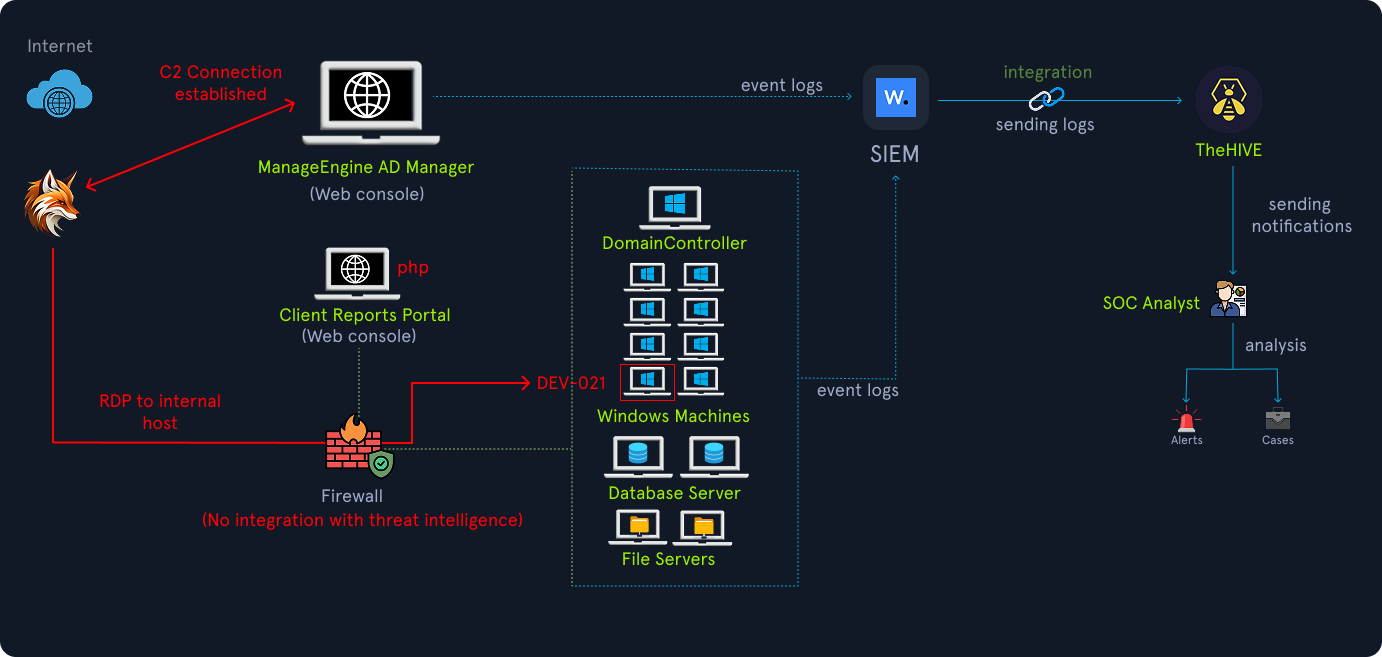
For this activity, the following event log was created in the Windows Event Logs with Event ID 4624.
Analysis of Insight Nexus Breach
An account was successfully logged on.

 Subject:
    Security ID: SYSTEM
    Account Name: DEV-021$
    Account Domain: INSIGHT
    Time: 2025-10-04T02:03:12Z

 Logon Information:
    Logon Type: 10

 Network Information:
    Workstation Name: DEV-021
    Source Network Address: 103.112.60.117

 New Logon:
    SubjectUserName: insight\svc_deployer
    SourceNetworkAddress: 103.112.60.117
After a successful logon, the attackers conducted some domain reconnaissance. They found some interesting file shares on the file server, which they attempted to access multiple times. On the file server, they located client project folders that contained draft reports, survey data, and market forecasts.
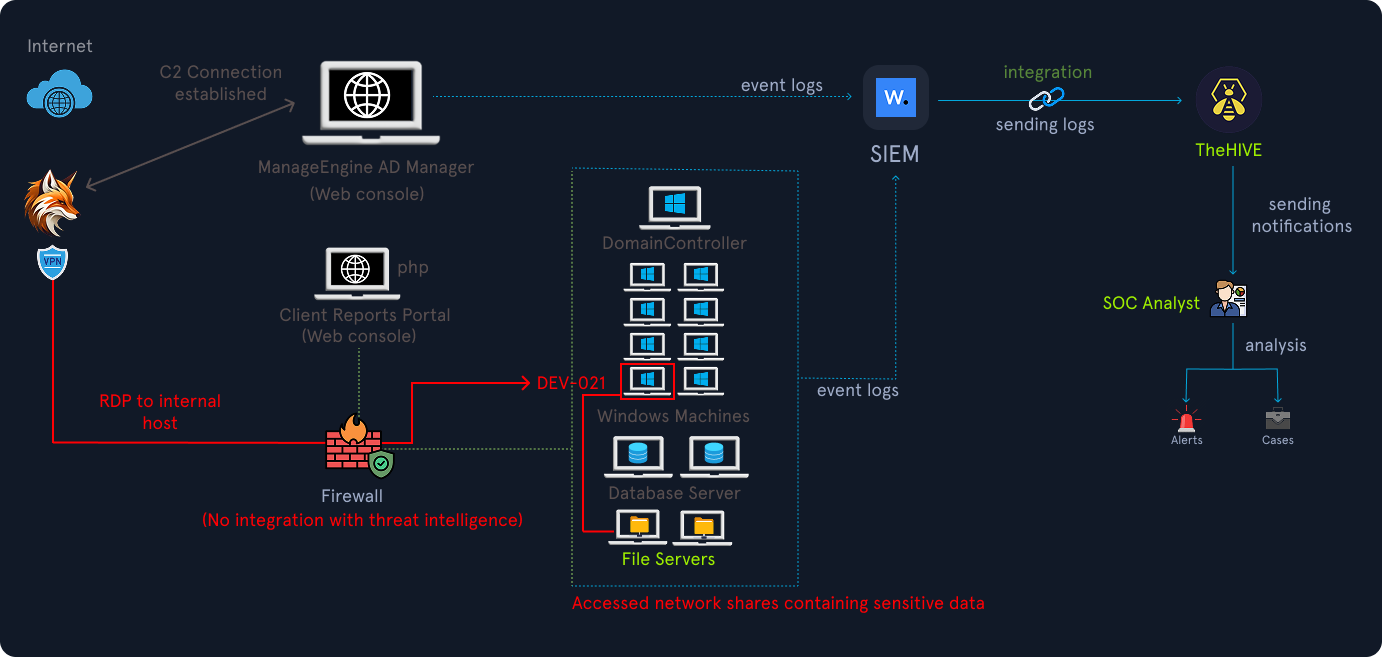
On the file server, multiple event logs were created, such as 5140(S, F): A network share object was accessed. However, there were no rules created for generating alerts specifically for these public IP RDP events.
These kinds of event logs can be detected using the following Sigma rule, for example:
Code: sigma
title: External Remote RDP Logon from Public IP
id: 259a9cdf-c4dd-4fa2-b243-2269e5ab18a2
related:
    - id: 78d5cab4-557e-454f-9fb9-a222bd0d5edc
      type: derived
status: test
description: Detects successful logon from public IP address via RDP. This can indicate a publicly-exposed RDP port.
references:
    - https://www.inversecos.com/2020/04/successful-4624-anonymous-logons-to.html
    - https://twitter.com/Purp1eW0lf/status/1616144561965002752
author: Micah Babinski (@micahbabinski), Zach Mathis (@yamatosecurity)
date: 2023-01-19
modified: 2024-03-11
tags:
    - attack.initial-access
    - attack.credential-access
    - attack.t1133
    - attack.t1078
    - attack.t1110
logsource:
    product: windows
    service: security
detection:
    selection:
        EventID: 4624
        LogonType: 10
    filter_main_local_ranges:
        IpAddress|cidr:
            - '::1/128'  # IPv6 loopback
            - '10.0.0.0/8'
            - '127.0.0.0/8'
            - '172.16.0.0/12'
            - '192.168.0.0/16'
            - '169.254.0.0/16'
            - 'fc00::/7'  # IPv6 private addresses
            - 'fe80::/10'  # IPv6 link-local addresses
    filter_main_empty:
        IpAddress: '-'
    condition: selection and not 1 of filter_main_*
falsepositives:
    - Legitimate or intentional inbound connections from public IP addresses on the RDP port.
level: medium
After exploring and observing for a week, they started compressing and exfiltrating selected data. The attackers packaged stolen client materials into a file named diagnostics_data.zip, a filename chosen to resemble routine telemetry. The archive was then uploaded to the attacker-controlled host over HTTPS. Because the filename resembled legitimate diagnostics data and the upload used standard HTTPS, it did not immediately raise alarms. This tactic increases the attackers chance of exfiltrating data before defenders escalate.
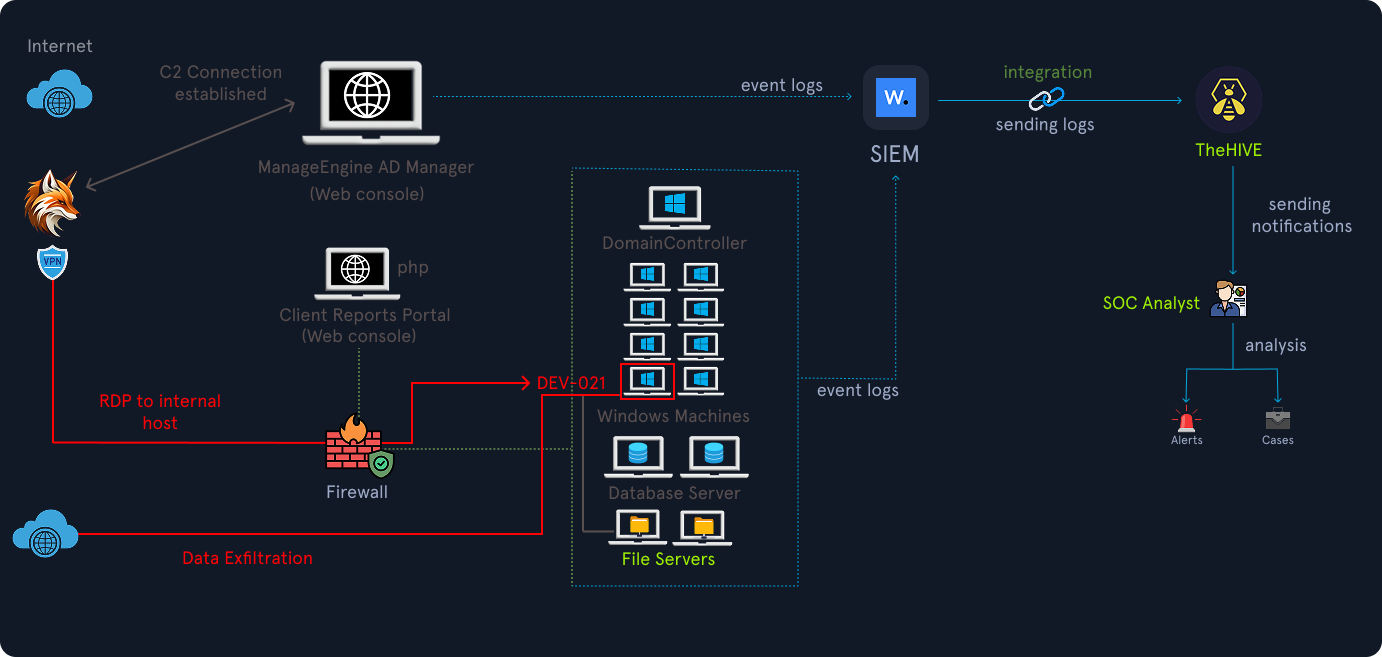
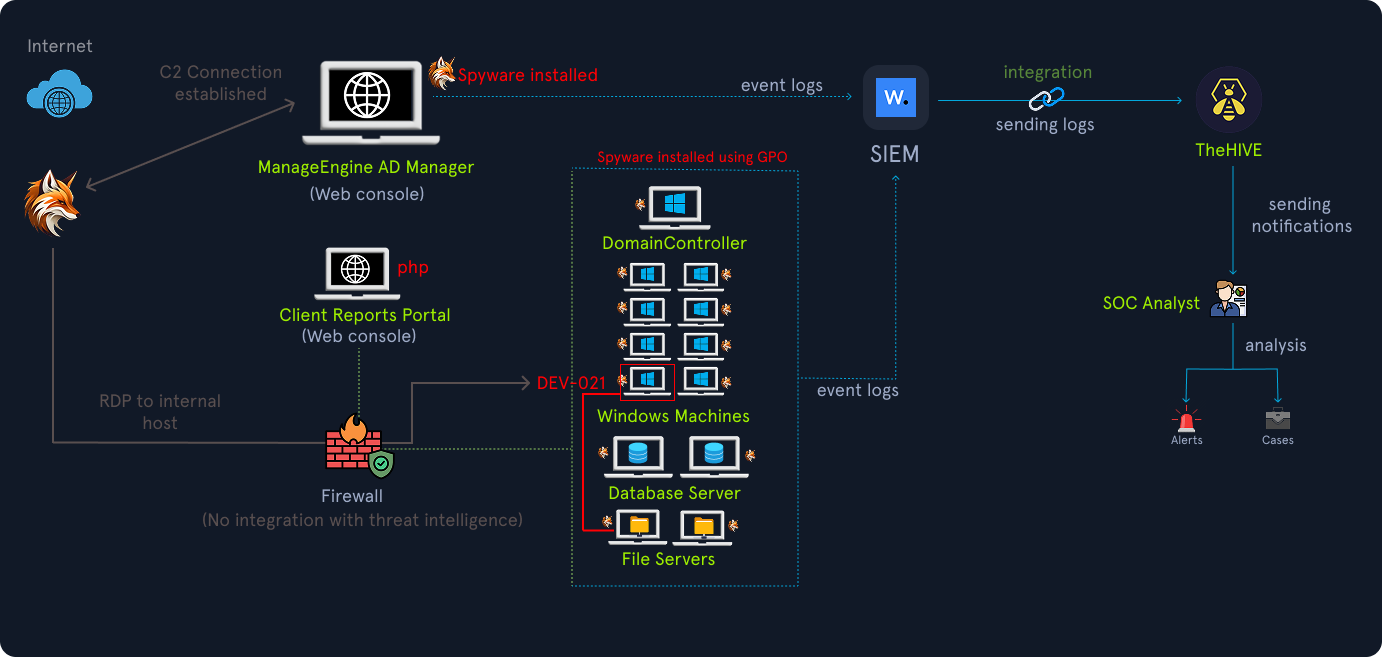
Then, on 2025-10-04 02:10:45, from DEV-021, they executed some PowerShell scripts that used domain administrator credentials to create a Group Policy Object (GPO) that pushes an MSI package (java-update.msi) across the domain. This MSI package created a scheduled task to run a process that performs spying and data exfiltration on the machines.
These events were also captured in the event logs, such as the creation of a new .msi file as Sysmon Event ID 11.
Analysis of Insight Nexus Breach
Sysmon Event 11: TargetFilename: C:\Windows\Temp\java-update.msi
Also, Sysmon Event ID 1 captures the command line for the execution of the .msi file in the background.
Analysis of Insight Nexus Breach
Sysmon Event 1: Image: C:\Windows\System32\msiexec.exe CommandLine: "msiexec /i C:\Windows\Temp\java-update.msi /quiet"
This malware, with spying and data exfiltration capabilities, is deployed on all domain machines using GPO.
Around the same time, another threat actor, Silent Jackal, also performed some activities on a separate PHP-based reporting portal. This server had an unpatched file upload vulnerability, which was exploited by the threat actor to gain access to this server. Silent Jackal uploaded a file into the root directory of the web server. Their activities appeared limited to leaving the checkme.txt marker file. This created noise in the environment and provided defenders with the first clue of compromise.
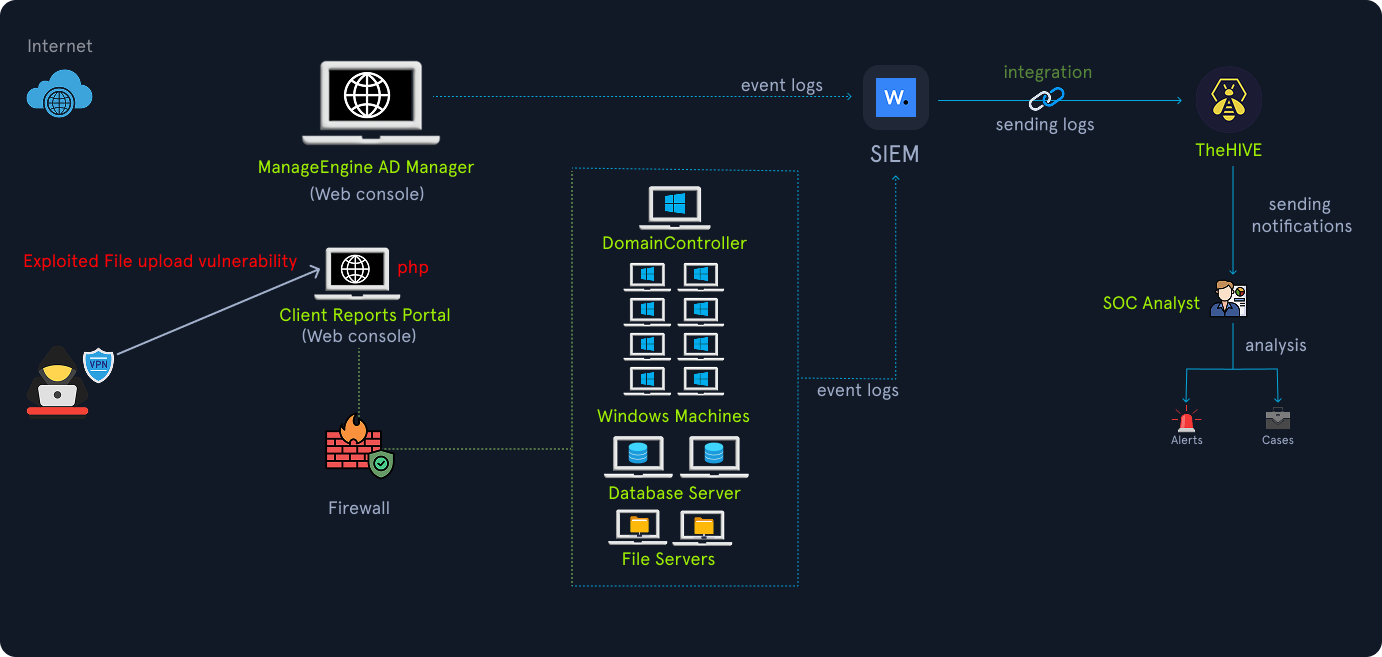
However, the threat actor did not proceed beyond their initial access. This was likely a low-skill intrusion meant to signal presence rather than cause immediate damage.
Organizational oversight: No web application firewall monitoring and no regular vulnerability assessments of internet-facing portals.
Crimson Fox reduced high-activity operations, with only occasional low-rate beacons to 103.112.60.117 to check for new instructions. Silent Jackal similarly reduced activity.
Immediate Incident Response Actions #
The first tangible discovery was checkme.txt by a SOC analyst. That file alone would normally be low priority, but the SOC analyst performing correlation saw that the same time window had ManageEngine events with unusual outbound traffic and multiple login events from an unfamiliar foreign IP.
The correlation of the following was done as follows:
- ManageEngine successful admin logins from foreign IPs.
- Sysmon process creation of
msiexecinstalling an MSI across many hosts. - LDAP enumeration logs and GPO changes.
- File server file compression and upload logs.
- Outbound HTTPS to an unusual IP address.
After the correlation, the SOC analyst immediately escalated the incident to the incident response team and opened a case in TheHive. The following actions and findings completed the investigation and response:
Case creation and triage- The SOC created a TheHive case titled “Insight Nexus — ManageEngine Compromise,” linked all related alerts (ManageEngine admin logins, Sysmon msiexec events, LDAP enumeration, file server uploads, and the portal
checkme.txtevent), and assigned roles: Triage Analyst, Forensics Lead, Containment Lead, and Communications Lead. - Priority was set to Critical due to confirmed data exfiltration.
- The SOC created a TheHive case titled “Insight Nexus — ManageEngine Compromise,” linked all related alerts (ManageEngine admin logins, Sysmon msiexec events, LDAP enumeration, file server uploads, and the portal
Containment — network controls- Blocked outbound traffic to
103.112.60.117at the perimeter firewall and on host-based firewalls. Added temporary egress block rules for the attacker IPs. - Added an IDS signature to alert on connections to
103.112.60.117and similar endpoints.
- Blocked outbound traffic to
Containment — credential & account actions- Disabled the ManageEngine admin account and rotated all high-privilege credentials exposed in logs (service accounts, deployer accounts, and any account showing suspicious activity).
- Restricted the ManageEngine web console to be accessed only internally.
- Implemented forced password changes and immediate revocation of active sessions where possible.
Host isolation- Isolated
manage.insightnexus.com,DEV-021, and any machines that showed evidence of MSI installation from the production network for forensic collection (network access blocked, but preserved in a manner to allow analysis). - Suspended scheduled tasks and disabled GPO-initiated deployments until confirmation of remediation.
- Isolated
Collect forensic artifacts- On isolated hosts, collected volatile memory, process lists, registry hives, and disk images. Exported ManageEngine audit logs and the web server access logs with full timestamps.
- Preserved copies of the MSI file (
java-update.msi), the compressed exfiltrated package (diagnostics_data.zip), and any web shell files found in management app directories.
Mapping to MITRE ATT&CK #
Reconnaissance: Scanning public assets; MITRET1595(Active Scanning).Weaponization / Initial Access: ManageEngine default credentials (T1078.004– Valid Accounts), PHP upload exploitation (T1190– Exploit Public-Facing Application).Delivery / Exploitation: Web shell uploads, console command execution; (T1505– Server Software Component).Installation / Persistence: Scheduled tasks, services, GPO-deployed MSI (T1547,T1543,T1069).Command & Control: HTTPS to attacker-controlled IP (T1071.001– Web Protocols).Action on Objective / Exfiltration: Compress and upload project data (T1560/T1041).
Lessons Learned #
The following lessons were learned:
Default credentialson Internet-facing applications remain one of the simplest but most damaging oversights.Multiple concurrent threat actorscan be present in a single environment, with different motivations — one opportunistic, one highly targeted. This complicates response because defenders may underestimate the severity if they only see the “loud” intruder.Failure to correlate alertsacross teams delays containment, giving advanced actors more time to achieve objectives.Post-incident monitoringmust include scanning for persistence mechanisms, since deleting an attacker’s marker file does not neutralize the root cause.