

When an investigation is started, we aim to understand what happened and how it happened. To analyze the incident-related data properly and efficiently, the incident handling team members need deep technical knowledge and experience in the field. One may ask, “Why do we care about how an incident happened? Why don’t we simply rebuild the impacted systems and basically forget it ever happened?”
If we don’t know how an incident happened or what was impacted, then any remedial steps we take will not ensure that the attacker cannot repeat their actions to regain access. If we, on the other hand, know exactly how the adversary got in, what tools they used, and which systems were impacted, then we can plan our remediation to ensure that this attack path cannot be replicated.
The Investigation #
The investigation starts based on the initially gathered (and limited) information that contains what we know about the incident so far. With this initial data, we will begin a 3-step cyclic process that will iterate over and over again as the investigation evolves. This process includes:
- Creation and usage of indicators of compromise (IOCs).
- Identification of new leads and impacted systems.
- Data collection and analysis from the new leads and impacted systems.
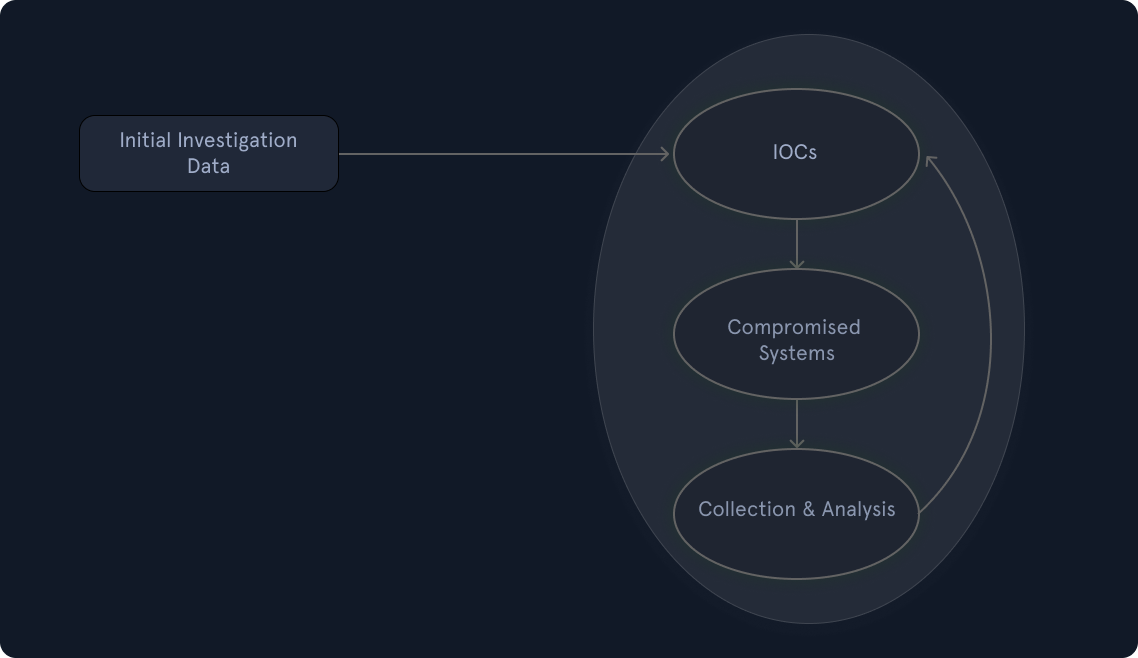
Let us now elaborate more on the process depicted above.
Initial Investigation Data #
In order to reach a conclusion, an investigation should be based on valid leads that have been discovered not only during this initial phase but throughout the entire investigation process. The incident handling team should constantly bring up new leads and not focus solely on a specific finding, such as a known malicious tool. Narrowing an investigation down to a specific activity often results in limited findings, premature conclusions, and an incomplete understanding of the overall impact.
Creation & Usage Of IOCs #
An indicator of compromise (IOC) is a sign that an incident has occurred. IOCs are documented in a structured manner, which represents the artifacts of the compromise. Examples of IOCs can be IP addresses, hash values of files, and file names. In fact, because IOCs are so important to an investigation, special languages such as OpenIOC have been developed to document them and share them in a standard manner. Another widely used standard for IOCs is YARA. There are a number of free tools that can be utilized, such as Mandiant’s IOC Editor, to create or edit IOCs. Using these languages, we can describe and use the artifacts that we uncover during an incident investigation. We may even obtain IOCs from third parties if the adversary or the attack is known. For example, CISA publishes the IOCs in a format called STIX (Structured Threat Information eXpression). STIX is an open-source, machine-readable language and serialization format, primarily in JSON, used to exchange cyber threat intelligence (CTI) in a standardized and consistent way.
As an example, in this report, we can check the “Downloadable copy of IOCs associated with this malware” section for the STIX file, which contains the IOCs in JSON format.
...SNIP...
        {
            "type": "file",
            "spec_version": "2.1",
            "id": "file--474454e8-d393-5a4f-9069-19631ea9d397",
            "hashes": {
                "MD5": "40e609840ef3f7fea94d53998ec9f97f",
                "SHA-1": "141af6bcefdcf6b627425b5b2e02342c081e8d36",
                "SHA-256": "3461da3a2ddcced4a00f87dcd7650af48f97998a3ac9ca649d7ef3b7332bd997",
                "SHA-512": "deaed6b7657cc17261ae72ebc0459f8a558baf7b724df04d8821c7a5355e037a05c991433e48d36a5967ae002459358678873240e252cdea4dcbcd89218ce5c2",
                "SSDEEP": "384:cMQLQ5VU1DcZugg2YBAxeFMxeFAReF9ReFj4U0QiKy8Mg3AxeFaxeFAReFLxTYma:ElHh1gtX10u5A"
            },
            "size": 13373,
            "name": "osvmhdfl.dll",
            "object_marking_refs": [
                "marking-definition--94868c89-83c2-464b-929b-a1a8aa3c8487",
                "marking-definition--d896763f-3f6f-4917-86e8-1a4b043d9771"
            ],
            "extensions": {
                "windows-pebinary-ext": {
                    "pe_type": "dll",
                    "number_of_sections": 4,
                    "time_date_stamp": "2025-07-22T08:33:22Z",
                    "size_of_optional_header": 512,
                    "sections": [
                        {
                            "name": "header",
                            "size": 512,
                            "entropy": 2.545281,
                            "hashes": {
                                "MD5": "2a11da5809d47c180a7aa559605259b5"
                            }
                        },
                        {
                            "name": ".text",
                            "size": 4608,
                            "entropy": 4.532967,
                            "hashes": {
                                "MD5": "531ff1038e010be3c55de9cf1f212b56"
                            }
                        },
                        {
                            "name": ".rsrc",
                            "size": 1024,
                            "entropy": 2.170401,
                            "hashes": {
                                "MD5": "ef6793ef1a2f938cddc65b439e44ea07"
                            }
                        },
                        {
                            "name": ".reloc",
                            "size": 512,
                            "entropy": 0.057257,
                            "hashes": {
                                "MD5": "403090c0870bb56c921d82a159dca5a3"
                            }
                        }
                    ]
                }
            }
        },
...SNIP...
In TheHive, we can add IOCs in the observables section of an alert.
![TheHive “Observables” tab for alert “[InsightNexus] Admin Login via ManageEngine Web Console.” Two observables listed: hostname “manage[.]insightnexus[…]” and IP “103[.]112[.]60[.]117,” both tagged TLP:AMBER and PAP:AMBER with no reports. On the right, “Adding an Observable” panel shows a Type dropdown (options: autonomous-system, domain, file, filename, fqdn, hash, hostname, ip), and an “Is IOC” toggle (off), plus fields for Tags and Description.](https://cdn.services-k8s.prod.aws.htb.systems/content/modules/148/hivealert2.png)
To leverage IOCs, we will have to deploy an IOC-obtaining/IOC-searching tool (native or third-party and possibly at scale). A common approach is to utilize WMI or PowerShell for IOC-related operations in Windows environments.
A word of caution! During an investigation, we have to be extra careful to prevent the credentials of our highly privileged user(s) from being cached when connecting to (potentially) compromised systems (or any systems, really). More specifically, we need to ensure that only connection protocols and tools that don’t cache credentials upon a successful login are utilized (such as WinRM). Windows logons with logon type 3 (Network Logon) typically don’t cache credentials on the remote systems. The best example of “know your tools” that comes to mind is “PsExec”. When “PsExec” is used with explicit credentials, those credentials are cached on the remote machine. When “PsExec” is used without credentials through the session of the currently logged-on user, the credentials are not cached on the remote machine. This is a great example of demonstrating how the same tool leaves different tracks, so we must be aware.
Identification Of New Leads & Impacted Systems #
After searching for IOCs, we expect to have some hits that reveal other systems with the same signs of compromise. These hits may not be directly associated with the incident we are investigating. Our IOC could be, for example, too generic. We need to identify and eliminate false positives. We may also end up in a position where we come across a large number of hits. In this case, we should prioritize the ones we will focus on, ideally those that can provide us with new leads after a potential forensic analysis.
Data Collection and Analysis from the New Leads and Impacted Systems #
Once we have identified systems that include our IOCs, we will want to collect and preserve the state of those systems for further analysis in order to uncover new leads and/or answer investigative questions about the incident. Depending on the system, there are multiple approaches to how and what data to collect. Sometimes we want to perform a ‘live response‘ on a system as it is running, while in other cases, we may want to shut down a system and then perform any analysis on it. Live response is the most common approach, where we collect a predefined set of data that is usually rich in artifacts that may explain what happened to a system. Shutting down a system is not an easy decision when it comes to preserving valuable information because, in many cases, much of the artifacts will only live within the RAM memory of the machine, which will be lost if the machine is turned off. Regardless of the collection approach we choose, it is vital to ensure that minimal interaction with the system occurs to avoid altering any evidence or artifacts.
Once the data has been collected, it is time to analyze it. This is often the most time-consuming process during an incident. Malware analysis and disk forensics are the most common examination types. Any newly discovered and validated leads are added to the timeline, which is constantly updated. Also, note that memory forensics is a capability that is becoming more and more popular and is extremely relevant when dealing with advanced attacks.
Keep in mind that during the data collection process, we should keep track of the chain of custody to ensure that the examined data is court-admissible if legal action is to be taken against an adversary.
Use of AI in Threat Detection #
Artificial Intelligence (AI) is transforming how organizations detect, triage, and respond to security incidents. In traditional IR workflows, analysts manually review logs, alerts, and reports. This process usually takes hours or days. AI automates much of this analysis, reducing response time and improving accuracy by learning from historical incidents and identifying behavioral anomalies faster than humans.
For example: Elastic Security’s “Attack Discovery” feature uses generative AI to analyze events from thousands of detections, summarizing and clustering related alerts into an attack story.
AI Attack Discovery leverages LLMs (large language models) to analyze alerts in an environment and identify threats. The summary represents an attack and shows relationships among multiple alerts to help us identifying which users and hosts are involved. This also show MITRE ATT&CK mappings. Here’s an example of how the attack discovery looks like:
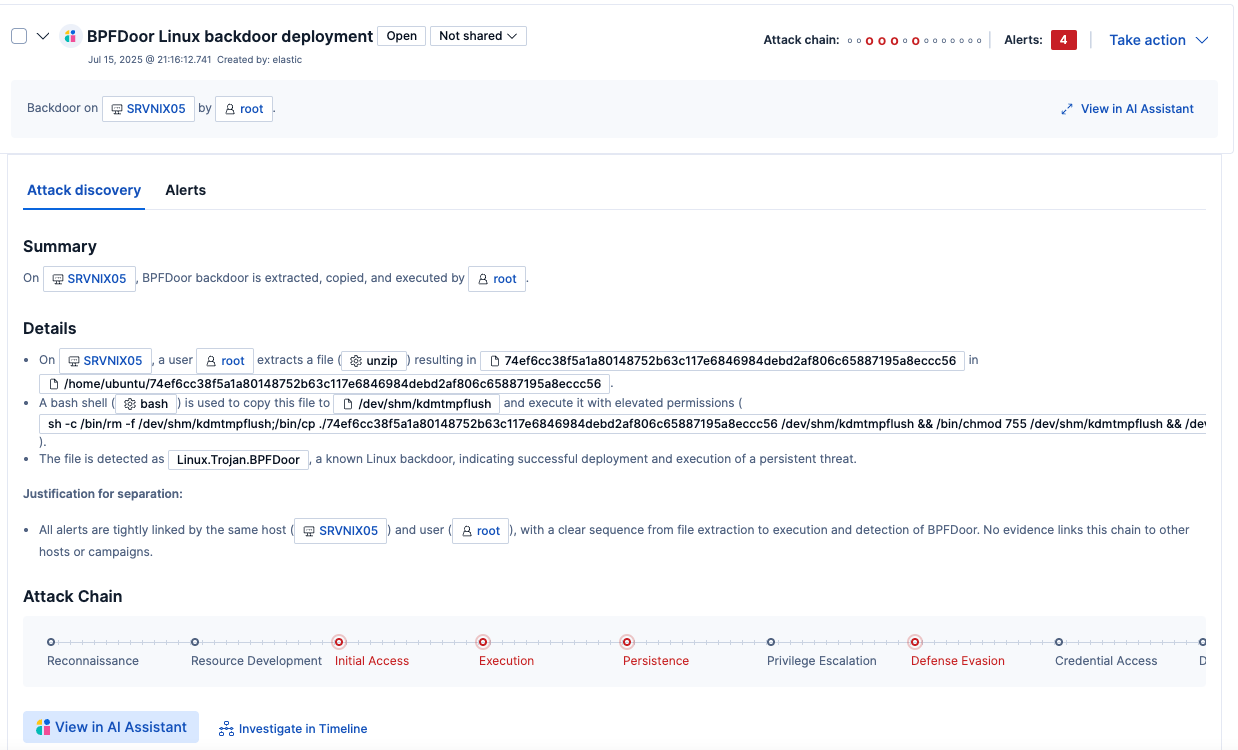
In this discovery, AI helped by going through multiple alerts and generated a comprehensive overview of the attack, identifying key activities that occurred during the incident. AI can help in incident response as well. Some of the use cases include:
- Automated Triage & Alert Prioritization
- Incident Correlation & Timeline Reconstruction
- Automated Response Playbooks
- AI Assistance in Post-Incident Analysis & Learning